The SpongeBob Incident
I’ve always been curious about the way things work but I haven’t always been into computers.
One of my core memories was back when I was in elementary school, we had just bought our first family computer from one of our neighbors for $400. I remember trying to install a PC game on it via a CD but not having enough storage. Naively, I deleted important files in the C Drive while trying to make space for my game, I don’t remember what game it was but it was something to do with SpongeBob. Immediately the computer stopped working and I attempted to reboot it. Except at the time no one in my family knew much about computers so we couldn’t get it back to a working state.
We went back to using the public library’s computers and I started learning how to skate instead.
That was when I first learned computers aren’t magic, they’re just systems that can break.
Why Isolated Environments Matter
That experience taught me two things: users shouldn’t be able to land themselves in a bad situation, but also that you need a safe place to experiment and break things without taking down your main system.
This is exactly what a homelab gives you, a sandbox where deleting the wrong files costs you an hour rebuilding a VM, not your family’s only computer. You get to break things and learn from mistakes without any real consequences.
What exactly is a Homelab?
It’s basically a personal server (or multiple servers) you run at home to experiment, learn, and host your own services. Think of it as your own private cloud where you can spin up virtual machines, test configurations, break things, and rebuild without consequences. You’re limited only by your hardware (RAM and storage mainly), but you can start with surprisingly little.
What Rekindled My Interest in Computers?
In my Senior Year in college my laptop could no longer run the latest Windows OS. It was becoming too slow. I researched online alternatives and that’s when I learned about linux. From what I read, linux made older hardware run smoother by only installing what you actually need. Given my prior spongebob incident, this time I wanted to approach this the right way. I joined a Linux club on campus that eventually dwindled to only four people, where I watched people way more skilled than me fly through vim and i3 commands. I wanted that same fluency. They taught me how to install and flash an ISO, pointed me to trusted online resources so I can also learn on my own. After that I was hooked, I now saw computers as something that I can make break but also bring it back to life, and modify and customize it exactly how I wanted it.
Proxmox
YouTube became an invaluable tool, people creating channels and building communities based on a specific topic, bringing years of knowledge in a condensed format. One of my favorite YouTubers, Learn Linux TV, showed me what Proxmox was. While I had gotten very comfortable with computers, I could never imagine myself installing all that on my own, let alone managing it, but step by step I was off. Watching someone walk through the setup made it feel possible, even when I had no idea what half the settings meant.

With the help of his videos and after 2+ painstaking hours, I finally saw the Proxmox web interface load. Relief washed over me, I hadn’t broken anything along the way! It felt like unlocking a new level of control over my own computer, and my curiosity lit up even more.
What I’m Running
Here are some of the systems I host and what I’ve learned from each:
Gitea
Gitea is how I self-hosted a Git server. I wanted control over my repositories and to understand Git hosting beyond just pushing to GitHub. Setting this up taught me about reverse proxies, I use Caddy which automatically handles SSL certificates, making the whole process way simpler than I expected.
Eventually I’ll tackle GitLab, but Gitea is lighter weight and perfect for learning. Plus, it runs great in a Docker container, which brings me to…
Docker
Docker is essential for running most modern services. Almost everything I run is containerized, which makes it easy to spin up, tear down, and rebuild services without polluting the host system. Learning Docker in my homelab has directly helped me at work, understanding container networking, volumes, and docker compose has been invaluable. I now run entire stacks with docker compose.
PostgreSQL
I run PostgreSQL in an LXC container using Proxmox’s turnkey template. Having my own database server taught me a ton about database management, backups, and recovery. I use it for several projects, and setting it up taught me the difference between LXC containers and full VMs, LXC is lighter and faster for services that don’t need a full OS.
I haven’t had to restore from backup yet (knock on wood), but knowing I have snapshots and backups configured gives me peace of mind to experiment.
Essential Tools to Get Started
Here are the tools I install on every VM to set a great foundation:
SSH
First thing I do on any new VM is set up SSH key authentication. It’s way more secure than passwords and saves so much time. Being able to manage headless servers remotely is fundamental to homelabbing.
VS Code Remote-SSH Extension
The VS Code Remote-SSH extension alone is worth using VS Code. I can edit caddy configs, docker compose files, everything right in my normal editor as if the remote files were local. It’s made working on my homelab so much easier than using vim over SSH (though I still use those sometimes). Check out the official documentation to get started.
Basic Security
- Set up firewall rules.
- Disable password authentication for SSH.
- Keep systems updated.
- Never expose services directly to the internet without understanding the risks.
Advice for Anyone Getting Started
I hope this provides a good starting point for anyone looking to get into homelabbing. I myself am barely scratching the surface on what’s possible. Here’s what I wish I’d known earlier:
Start Small
You don’t need enterprise gear or a rack of servers. Old hardware is fine for learning. I started with a spare desktop and it’s been enough to run everything I need.
Document Everything
You WILL forget commands and configs. I keep notes on everything I do, what worked, what didn’t, and why. Future you will thank present you. Here’s my opensource dev-setup to show some scripts and apps I consider essential to homelabbing.
Join Communities
In-person communities (or remote ones) are monumental to being a lifelong learner!
r/homelab on Reddit has been incredibly helpful. Seeing other people’s setups and solutions to problems saves so much time (and headaches)!
Embrace Breaking Things
That’s the whole point. There’s a Spanish saying that says “Echando a perder se aprende” which translates roughly to “You learn by messing up” or more literally “By ruining things, one learns.” Snapshots are your friend. I’ve nuked VMs more times than I can count, and each time I learned something new.
Security Basics Matter
Make sure to use best judgment and never expose a port to the public internet without understanding what you’re doing. Use firewalls, keep systems updated, and always assume no system is safe.
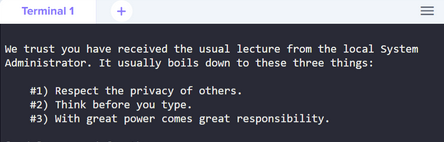
As Linux tells us, with great power comes great responsibility.
What’s Next
I’m constantly learning and adding new services. Some things on my radar:
- Monitoring: Proper observability with Grafana and Prometheus for metrics visualization.
- Infrastructure as Code: Terraform mainly because it’s brilliantly named.
- Local AI: Running Ollama for local LLMs. Having your own inference server means you can experiment with AI without API costs or privacy concerns.
- Agentic AI Infrastructure: Building sandboxed environments for AI agents to safely execute code and interact with tools. A homelab is perfect for this since you control the isolation boundaries.
- Self-hosted GitLab: Eventually migrating from Gitea to GitLab for CI/CD pipelines.
The beauty of a homelab is that it grows with you. Start simple, break things, learn, and rebuild. That’s how you actually learn this stuff.